


- Rebuilt the client/server protocol to use an always-connected WebSocket
- Switched to square/wire for protocol buffer code generation
- Dropped AndEngine in favour of "raw" OpenGL for the starfield view
- Converted to Fragment-based, instead of Activity-based app (i.e. single Activity and multiple Fragments)
- Tweaked NameGenerator a bit, and greatly expanded the vocab files so that we should have more variety and less repetitive star names
- Added an "energy_congeniality" property to planets which will control their base engergy production (similar to farming/mining/population congeniality)
What would War Worlds 2 look like?
PostedLook, I'm not promising anything here, but this is something I've been thinking about for a little while. Some of you may have seen some of the stuff I've been working on lately (here or here, for example), but one of the things I've realised is that content-heavy games are really really hard. I've spent more time in Blender than I have in my IDE, and I'm not really suited to that sort of work.
I've been doing a little bit of War Worlds work lately (mostly making sure it will continue to function after the SSL certificate expires), but it's got me thinking. What would I do if I wanted to pick up War Worlds again? I think given the long absense, it might be a good opportunity to think of what working on a new version of the game would look like.
So, if you had to start over, what would you change?
Cash
I feel like the main thing in War Worlds today that I would change if I had the chance is cash. It's a huge pain in the early game, because you never have enough of it and the "slowness" of the early game is probably one of the biggest complaints I hear (apart from crashes 🤔). Later in the game, players tend to have so much cash that it's a total non-issue.
If we got rid of cash, I think there's a couple of things we'd need to replace it with.
- Because you could no longer accelerate builds, I think it would be simpler to just reduce build times significantly overall. Also, we'd need to make it clearer how focus and population affects build times in general.
- Using cash to send fleets could be replaced with "fuel", which could be a collected resource like farming and mining is today. Or we could just get rid of the "cost" component of sending fleets at all.
- Cash is a pretty big incentive to join an alliance. Some better trading or something could replace cash as the incentive (e.g. you can directly trade ships between alliance members)
Alliances
On the topic of alliances, I feel like alliances in the current game are a bit of an after-thought (well, they are). Something that is more fundamental would be good and in particular I'm thinking of a more fully fleshed-out trading system as well as the ability to coordinate attacks and actually work together.
Technical changes
The current architecture of the game isn't bad, but there's a lot of changes that I think I would make if I were to start over again. If you're not interested in the technical aspects, you can just skip this whole section and jump to the Conclusion.
Single-activity app
On the client, I think the multi-activity architecture has hurt us a bit. Resuming activities and the activity lifecycle is the source of many crashes. It would also simplify and speed up the game (not to mention fix many out-of-memory issues) as we wouldn't be creating and destroying the starfield map all the time.
I've thought about doing something cross-platform with iOS as well, but I don't think I have the resources to manage two platforms.
Always-connected WebSocket-style API
The current API is pretty HTTP-centric. Every request is a full HTTP request and response. This is a bit of a hang over from the days when the server ran on App Engine, and it's not the best architecture from a latency/bandwidth point of view. Whether we'd move to actual WebSockets or maybe something custom, I'm not sure. But there's no reason the main API between the client/server needs to be request/response style HTTP.
"In-memory" persistent world
Also related to the HTTP-centric API, the server itself is mostly stateless. Each request loads the data it needs from the database, processes it and saves it back to the database again. That's great from a resiliency point of view, but it's terrible from a performance point of view. I feel like a better architecture would be to load sectors into memory while a client is looking at it, process requests purely in memory and persist the whole sector back to disk periodically as needed.
If we got rid of cash from the game, that would also remove much of the need to be constantly simulating stars. Currently, the only reason we need to constantly be simulating stars is in order to calculate your cash income. If we moved to a model where sectors of stars were loaded into memory, it would be possible to "freeze" the sectors while nobody was looking at it, and only unfreeze it when actually needed.
Conclusion
These are some of the ideas I've been tossing around in my head lately. I'd love to hear what you guys think the game needs (but remember: no promises!)
War Worlds is looking for a new home
PostedSo it's been almost exactly one year to the day that I initially announced "shutting" War Worlds down. There was a lot of support for the idea of keeping it running, and I've tried to do that -- the donations I received at the time allowed me to keep War Worlds running for several months, but the time has come that I can no longer keep the servers up for much longer.
But rather than shutting down completely, I'm looking for someone to keep the fires burning and host the servers. Development of War Worlds has slowed down, but we've got a dedicated player base and it would be sad to see that go.
So if you're interested in hosting the War Worlds server, here's what's required:
- At least 2 CPUs
- 4GB RAM
- ~20GB of disk space (depending on how many local backups you want to store)
- The ability to run a custom Java server + cron jobs (basically that means we need a VPS)
The game needs a reasonably beefy server to keep all of the stars simulated, which is what as contributed most to the cost for me.
If you have a server which fits the bill available, please contact me and we can get started on the migration.
I'm basically going to run out of money to continue paying the bills in around a month, so we're going to need to find a solution fairly soon.
Wormhole Disruptors and mega-improved Starfield view
PostedToday's update of War Worlds has two big improvements. The first is there's a new "tactical" view of the starfield, which should generally be much better performing. You can see an example of it here:
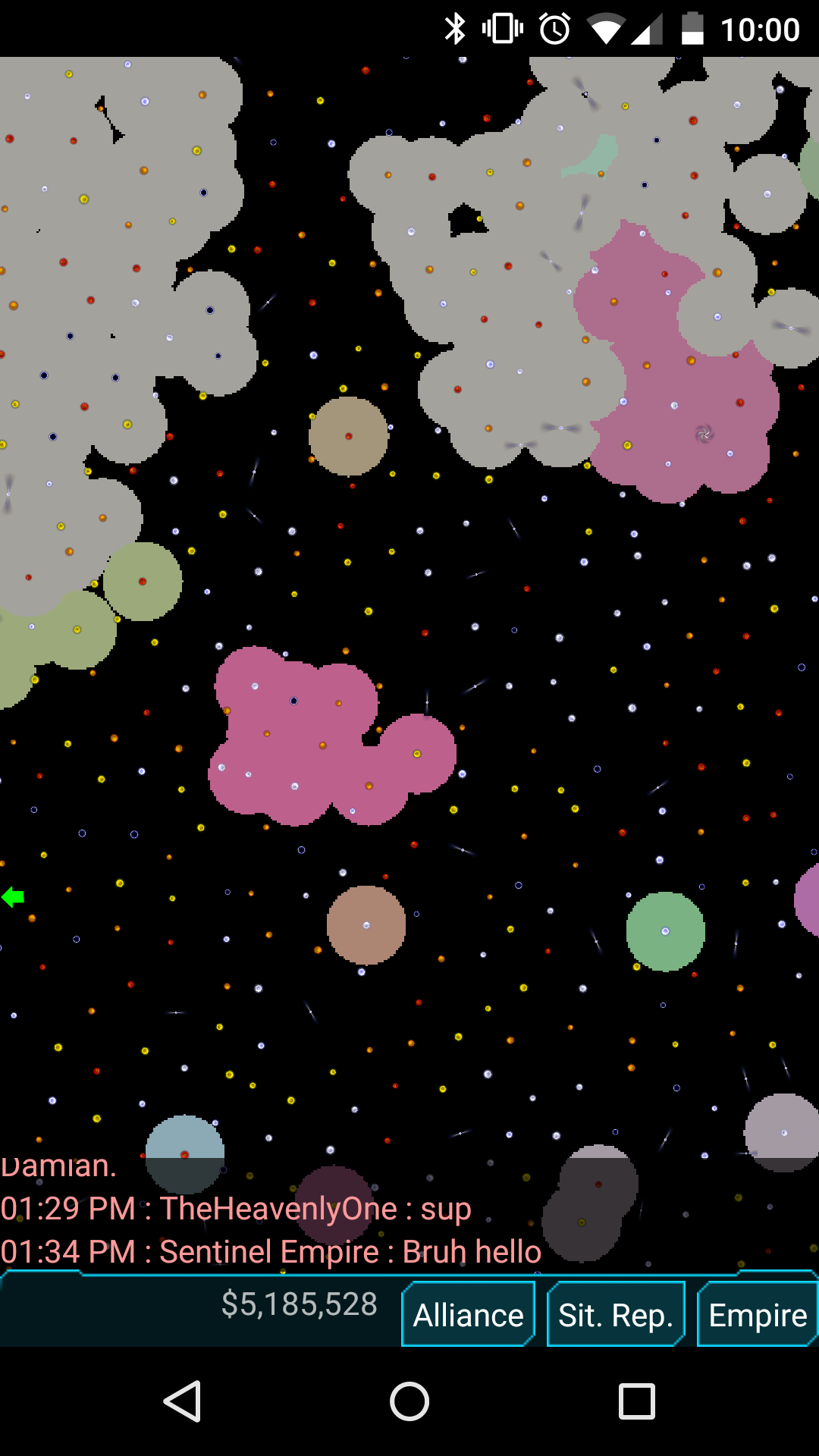
That's what you'll see when fully zoomed out, the circles will fade away and the labels/icons will fade back in as you zoom in. You'll also notice that scrolling has been completely fixed, and you don't get that weird jumping around that you used to get in previous release. Man, that one had been bugging me for ages!
Also fixed in this release is the purchase of shields and empire names. In previous versions, if a shield change failed to be applied due to an error on the server (recently I had an issue where the server had run out of space, so all uploads were failing) the client would still "consume" the purchase and you would have been charged. Obviously that's not a great experience, so now purchases are only consumed once the client gets confirmation from the server that the change actually applied. If you get an error, you can retry without being charged again. (I should note, if you continue to get errors, please email me with your empire name and the change you want to make... I'm quite happy to do these for free if the purchase fails)
Wormhole Disruptors
But by far the biggest change in this release is the addition of the Wormhole Disruptor building. This is a building you can build on your star, and it allows you to "disrupt" (either destroy or take over) wormholes nearby.
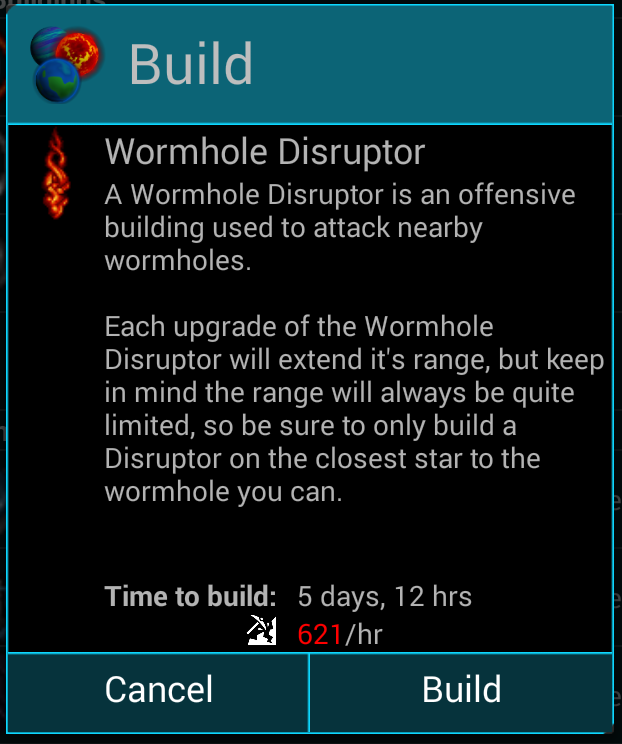
Note that because it's a building you build on a star, in order to take over an enemy wormhole there is actually quite a bit of work you need to first. You need to take over a star near the target wormhole, build a disruptor on it, then upgrade it so that has enough range to reach the wormhole. You can see the range of your wormhole disruptor in red on the starfield view:
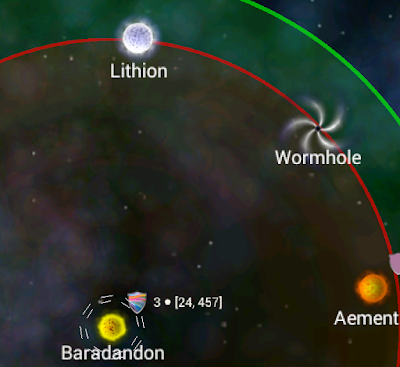
Once your wormhole disruptor is upgraded enough, two new buttons will be enabled on the enemy's wormhole screen, "Take over" and "Destroy":
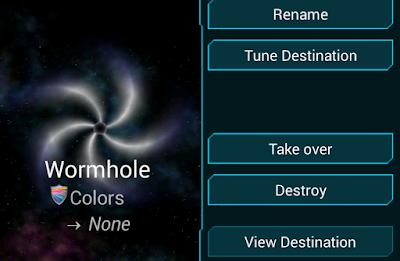
The two buttons do what you would expect, "Take over" allows you to take ownership of the wormhole yourself, you can then tune it to one of your alliance's wormholes (if it's already tuned when you take over, the tuning will be reset). Destroy will simply destroy the wormhole (and any ships that are currently at the wormhole will also be destroyed!)
Some other improvements have been made to wormholes as well. You can now see who owns a wormhole when you select it in the starfield view, and there's also a "Locate" button which allows you to jump straight to the wormhole it's tuned to.
There's a bunch of other fixes in this release, head over to the github issue tracker for the complete list.
OK, so we're not shutting just yet...
PostedAfter my last post, I got quite a bit of feedback from people that they didn't actually want to shut the game down. And in fact, I'm quite happy to keep it up and running and also act as a sort of "project manager" if people wish to contribute bug fixes and so on. So in that vein, War Worlds is not going to be shut down.
However, you will have noticed over the last few months that there basically hasn't been any updates to the game at all. That's kind of a shame, but I'm hoping I can continue to contribute to the game, though perhaps at a slower pace than before (that's probably a good thing, I wouldn't want to burn out all over again!). As mentioned in the previous post, the complete source code for the game has been published on Github, and I'm more than happy to accept patches from anybody willing to contibute.
If you're not a programmer or artist and you can't contibute materially to the game, then I'm also in quite a bit of need of financial assistence to keep the server up & running. I have considered in the past moving to a cheaper host, but in the end, I stick with Google for a few reasons:
- They're fast. War Worlds is surprisingly CPU-intensive, and I need at least a few cores available to have decent response times,
- They're extremely reliable. I haven't touched the servers once in the last two months, and they're still humming along quite nicely.
In any case, what this basically means is, I'm always in need of financial assistence, there's two ways you can help with that. One is by purchasing in-game items (rename stars, and so on). But that gives a 30% cut straight to Google. Another way that I've just introduced, is the PayPal "Donate" button you can see at the top of the page here. Here is the button again, in case you missed it:
Click it. Donate. It really helps :-)